What the hell have you done to the once great Crap Cleaner. Yeah, I go way back with you,
About a month ago I did a full scan and clean and CC wiped out ALL my Firefox bookmarks (HUNDREDS!!!) and there was no way to recover them via backups or otherways.
Yes I exhausted every way I could but CC nuked them all. I went online and found hundreds of users that this happened too. WTF did you guys do???
I’ve been a subscriber for a long time and never had this issue.
I went on your site and asked for a refund…no response.
It’s still on my PC with all the latest updates, but truly, I am afraid to use CC now. Sticking with Glary.
Hate to see you go but what you put people thru was not good mates. Hope you fired the guy who made that disaster of an update.
How can I and the thousand of others trust you now?
Hi @devangelou,
Sorry you have experienced this issue with your Firefox book marks.
I am not able to replicate this issue please could you let me know what versions of Firefox and CCleaner you are using.
Also let me know if you experienced this while using Custom Clean or Health Check.
I have sent you a DM in regards to your refund request.
Hi, My Firefox is the latest version as is my Windows. At the time this happened I was using the latest CC. I always keep it up to date. I noticed CC has had a swarm of updates since this happened so I was thinking you guys were rushing to clear this mess. Even though with all your current updates I’m leary of using CC now. I’m no novice when it comes to a PC. What happened was that ALL my Firefox bookmarks were deleted as well as the backups. I also had the .json file of the backup and Firefox no longer could use that to restore this mess. Someone online mentioned to find 2 .sqlite files in a deeply hidden and nested folder and delete them to restore the damage that CC has done!!!
I suggest that you dev’s @ CC really do a thorough search in the user comments and see that this has been happening for years.
Oh, and I always used the Health Check feature. Look, I’ll stick with Glary Utilities for now. Never had an issue with them. Never.
I use Bitdefender Total Security. The warning message you show is what I see at the top of my Firefox window. All my bookmarks and saved passwords are gone or not available. I just renewed CCleaner. What is the fix for this problem?
I don’t think that they are gone, just not accessible like that warning message says.
Try temporarily disabling or uninstalling your Bitdefender TS, then Restart your machine and open Firefox.
If Firefox is back as it should be then that’s a clear indication of what was/is causing the problem.
PS. That browser warning does clearly to point to “something” locking up the files so Firefox can’t access them.
However it seems not everyone affected is getting that warning, so there may be more than one thing going on here for different people.
Just because the results (missing bookmarks) look the same or similar doesn’t necessarilly mean it’s the same cause in all cases.
If everyone affected could provide Laurence with the logs that he asks for then that will help track down the cause(s).
Can you look into why all my saved passwords dissappeard ? I have been using the tool for a long time. I DO NOT want my saved passwords removed. NP6NL is my file CCleaner for Windows
I’ve been a long time user, way back when it was called Crap Cleaner. I subscribe as well. But when this subscription is over I will no longer be using CC. That was crazy with that latest, ha ha, upgrade to totally wipe out all my Firefox bookmarks, hundreds!, and the backups!, and now you want me to send you reports and to do the investigative work that CC should have done with beta testing before putting this nightmare out. So it’s goodbye, and I’ll switch to Glary that has NEVER given me a problem, ever.
Hi @devangelou,
After investigation of this issue, it was most likely caused by Firefox being closed while writing to its Library, and this causes it to create a new profile.
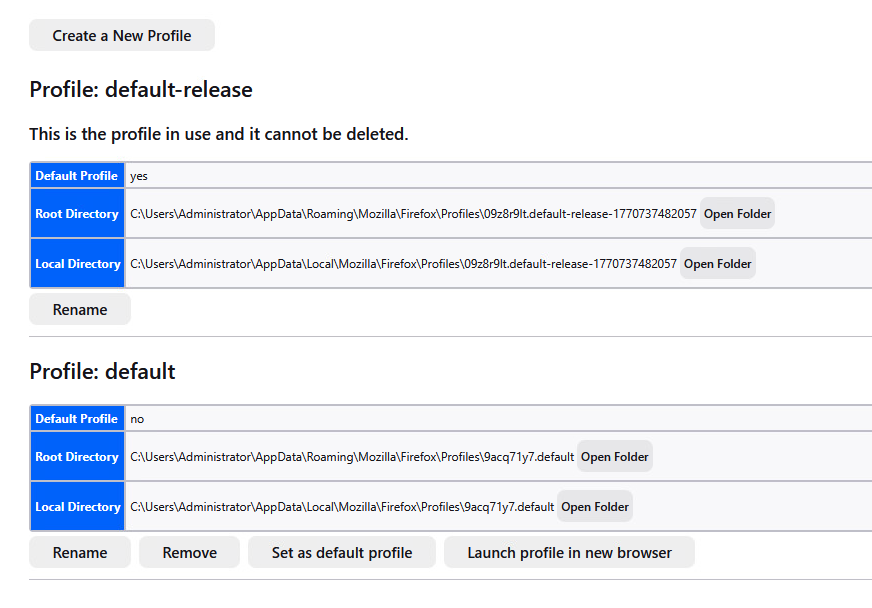
Your bookmarks were not lost, you are using a different profile.
Please could you launch Firefox and enter the location below into the address bar:
about:profiles
Which should look like the page below.
Then, find the Profile: default and select Launch profile in new browser.
This should launch a new window and have your old bookmarks loaded.
Please let me know if this does not restore your bookmarks.
If you’re dealing with those non-stop CCleaner update popups, you’ve likely noticed that closing them in Task Manager does nothing they just bounce right back. Here is how to actually fix it:
Disable the Scheduled Task: Open the Windows Task Scheduler, go to the “Task Scheduler Library,” and find any task named “CCleanerUpdate.” Right-click and Disable it.
Stop Automatic Checks: Open CCleaner, go to Options > Updates, and uncheck “Automatically check for updates to CCleaner” so it doesn’t just re-enable that task later.
Protect Your Bookmarks: Because users have reported CCleaner wiping browser bookmarks during updates, it’s best to disable browser cleaning in the app settings until they patch it.
Use Native Backups: Always keep your browser’s built-in sync (like Firefox Account sync) turned on; that way, even if an app wipes your local files, your bookmarks are safe in the cloud.
Exactement comme moi ! La totalité de mes mots de passe enregistrés sur firefox a été effacé lors du dernier nettoyage hier (08-03). C’est la première fois que ça arrive je suis cliente depuis plusieurs années. J’ai la dernière version de CC et la dernière version de firefox. Je ne comprends pas ce qui a pu se passer ce n’est pas habituel. Impossible de récupérer mes mots de passe je dois les réenregistrer manuellement un par un j’en avais des dizaines. J’utilise un PC avec la dernière version de Windows.
Je ne vais plus oser faire de nettoyage avec CC si je risque de voir s’effacer d’autres fonctionnalités ?
I did notice that if you use CC while FireFox is open it tells you to close the browser to continue the cleaning, which I always do. Are you saying that you should always have Firefox completely shut down even before you begin CC?
Oui Firefox était fermé je le fais toujours. Suite à tous les essais que nous avons fait sans succès je commence à penser que le problème vient de Firefox. Je vais chercher de ce côté-là aussi car dès que j’éteins Firefox (je l’ai fait il y a quelques minutes) les mots de passe que j’avais remis manuellement ont à nouveau disparu ! Il y a peut-être un problème chez eux.
If you search this CCleaner for Windows board for “Firefox bookmarks” you’ll find several topics from users who had their bookmarks, passwords and/or other Firefox Profile files (e.g., places.sqlite, favicons.sqlite, etc.) corrupted after upgrading to CCleaner v7.x. For example, see:
NOTE: If you follow employee Laurence_CCleaner’s advice in their 04-Mar-2026 post <above> and find that Firefox has NOT created a new Firefox profile since your bookmarks and/or passwords disappeared then you might still be able to recover these missing items. See the various fixes suggested in NicolaB’s 11-Nov-2026 I accidentally cleaned Firefox bookmarks! - unfortunately, no single solution suggested in NicolaB’s topic will work for everyone.
I am currently using CCleaner v6.39 and it also prompts me to close my Firefox browser before running a Custom Clean, but if I fail to close Firefox before I start the clean it simply skips over my Firefox cleaning and does not damage my bookmarks, etc. Whatever is causing CCleaner v7.x to delete or corrupt Firefox bookmarks, passwords, etc. seems to be a problem that is unique to CCleaner v7.x.
I would strongly advise you stop using CCleaner to clean you Firefox browser, and just use your Firefox settings at Privacy & Security | History to automatically clear your browsing history each time you exit Firefox - see the Mozilla support article Delete browsing, search and download history on Firefox.
It’s completely understandable why you’re hesitant to use the app after losing years of bookmarks. This issue usually stems from a specific conflict between the cleaner’s browser database access and Firefox’s sync files during an update.
Try this:
Disable Browser Cleaning: To prevent this from happening again, open CCleaner and uncheck Bookmarks/History under the Firefox/Applications tab before running a scan.
Restore via Firefox: Check your Firefox profile folder (type about:support in the browser) for a folder named bookmark backups. Firefox often saves daily snapshots that might have survived the scan.
Enable Native Sync: Moving forward, use a Firefox Account to sync your bookmarks to the cloud. This keeps them safe even if local files are deleted by third-party software.
Request Refund via Support Ticket: If the website form didn’t work, try reaching out directly through the billing support portal with your transaction ID to escalate the refund request.
J’ai tout essayé, c’est compliqué et il n’y a pas de dossier “bookmark backups”. J’ai sécurisé mes données sur un fichier à part. Je vais laisser courir mais je ne renouvellerai pas mon abonnement je pense, cette nouvelle version ne me convient pas du tout. Merci encore pour votre réponse.