We now have numerous posts from users disappointed with the new v7 and asking if/how they can roll back to v6
Whilst normally I would say that you should use the latest version that works on your machine I also believe that you should have the choice to roll back from a major feature update.
Particularly if/when that update is flawed.
So here is how to do it using the official v6.## installer.
Follow ALL of the instructions, do not skip any, they are all important.
-
Uninstall CCleaner v7.
“Restart” your computer. (NOT Shutdown/Reboot) -
Download a v6.## installer here: https://download.ccleaner.com/slim/ccsetup641_slim.exe
-
Double click the downloaded “ccsetup6##_slim.exe” to install v6.## Free version.
-
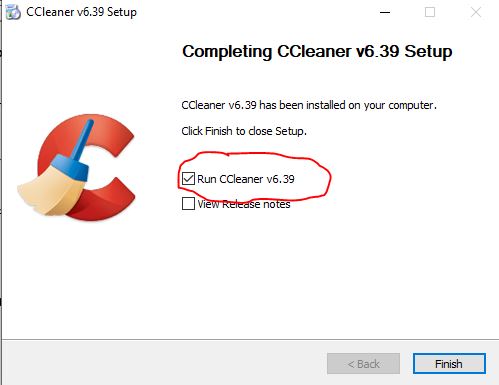
Run CCleaner v6.## from the last page of the installer (see image) and before closing it go to Options>Updates and untick the boxes there. That will turn off the Automatic updating.
-
To go an extra step to prevent automatic updating then:
Open File Explorer and go to C:\Program Files\CCleaner
Delete the file - CCupdate.exe
If the CCupdate.exe isn’t there at all then nothing can trigger it to run. -
If you have a CCleaner licence you will need to fo to Options > Licence Key and enter your licence key to Register/Activate v6.39 as Professional.

Things to note:
- This will be a completely new install of CCleaner v6.## with default settings.
Unless you had already saved your previous settings to an INI file and saved a backup copy of it before you updated to v7 then you will need to redo all your settings from scratch. - Installing v6.## will not uninstall CCleaner v7.
If you want v7 gone then you need uninstall it yourself.
You can see I have both v6 and v7 versions installed here - Note the install dates, I have re-installed v6.39 a day after I had updated to v7:

Edit- (15/10/025) - CCleaner have now added some roll-back instructions to their support webpages - basically just a shorter, cut down, copy of what is above.
Edit- (13/11/2025) - I have had a request from the Forum Administrator that I add the following information:

EDIT (21/04/2026)
Well in an unexpected surprise, and despite the previous official statement that there would be no further updates to v6.39 - there is now a CCleaner v6.40 - It is a maintenance update to fix some web connection issues for users of Windows7 and Windows8.
EDIT (20/06/2026)
CCleaner v6.41 is now available.
The change this time is to supposedly better comply with data protection laws (GDPR) in Europe.