We now have numerous posts from users dissapointed with the new v7 and asking if/how they can roll back to v6.39. (Or now v6.40 if you have Windows 7 or Windows 8 - see the 3rd edit below).
Whilst normally I would say that you should use the latest version that works on your machine I also believe that you should have the choice to roll back from a major feature update.
Particularly if/when that update is flawed.
So here is how to do it using the official v6.39 or 6.40 installer.
Follow ALL of the instructions, do not skip any, they are all important.
-
Uninstall CCleaner v7.
“Restart” your computer. (NOT Shutdown/Reboot) -
Download a v6.39 installer here: https://download.ccleaner.com/ccsetup639.exe
Alternatively there is now v6.40 (primarily for Win 7 & 8 users): https://download.ccleaner.com/sunset/ccsetup640_win7.exe -
Double click the downloaded “ccsetup639.exe” to install v6.39 Free version.
-
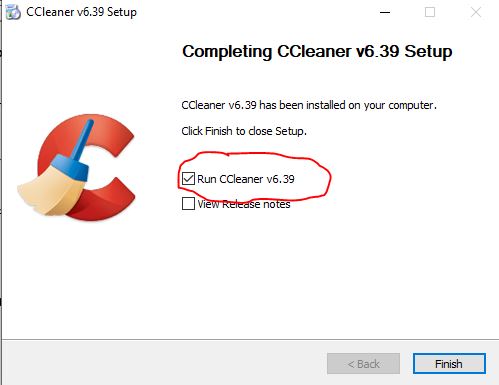
Run CCleaner v6.39 from the last page of the installer (see image) and before closing it go to Options>Updates and untick the boxes there. That will turn off the Automatic updating.
-
To go an extra step to prevent automatic updating then:
Open File Explorer and go to C:\Program Files\CCleaner
Delete the file - CCupdate.exe
If the CCupdate.exe isn’t there at all then nothing can trigger it to run. -
If you have a CCleaner licence you will need to fo to Options > Licence Key and enter your licence key to Register/Activate v6.39 as Professional.

Two things to note:
- This will be a completely new install of CCleaner v6.39 with default settings.
Unless you had already saved your previous settings to an INI file and saved a backup copy of it before you updated to v7 then you will need to redo all your settings from scratch. - Installing v6.39 will not uninstall CCleaner v7.
If you want v7 gone then you need uninstall it yourself.
You can see I have both versions installed here - Note the install dates, I have re-installed v6.39 a day after I had updated to v7:

Edit- (15/10/025) - CCleaner have now added some roll-back instructions to their support webpages - basically just a shorter, cut down, copy of what is above.
https://support.ccleaner.com/s/article/reverting-to-ccleaner-6-what-you-need-to-know?language=en_US
Edit- (13/11/2025) - I have had a request from the Forum Administrator that I add the following information:

EDIT (21/04/2026)
Well in an unexpected surprise, and despite the previous official statement that there would be no further updates to v6.39 - there is now a CCleaner v6.40 - It is a maintenance update to fix some web connection issues for users of Windows7 and Windows8.
The change is a (supposed) “bugfix” mainly for Windows 7 users who may not have been able to reach the CCleaner servers.
It is available to download as the “Sunset release” on the Builds page, or see the 2nd link at Step-2 above.