And if things weren’t bad enough, I just got an email telling me my subscription was going up by $10! Canceled it, of course
3 Likes
I have a subscription too. Basically I pay to run an old version (6.39) 
1 Like
I’m uninstalling now because I am afraid to keep using CCleaner with all the problems in V7. 20-year user here on multiple devices and having convinced many people to subscribe. This goes beyond inconvenience to betrayal.
2 Likes
I only want it running when I need to do a cleanup. I bought the Pro some time ago and been renewing every few years and have been using it for nearly 20 years now. I have to say version 7 runs as a service in the background. I had to make scripts to kill the service and exe that is forced to run all the time on startup. This now feels like malware. We bought this product to take control of our system and clean and stop services from running and using resources, now the product has become what we were fighting. I use this on my systems and my elderly fathers machine, he upgraded to 7 and this is where I made the scripts to kill it on boot. There is no way to not run it on boot and stop it from running in the background as a service and executable. If this is the future of Ccleaner we are no longer renewing our subscriptions. I’ll get other free and cheaper products that do the same thing. It was nice to have a single well oiled prodduct that did it all and gave us options. This reminds me of the volvo that was designed by all women that where you have to remove the front end of the car to do any maintance.
I have used CCleaner for about 15-20 years (free) and swore by it. I have been a computer tech (professionally trained) for just as long. A great, free product that actually worked, no gimmicks. I’m glad to see I’m not alone in HATING the new layout. It’s horrible. And even if I edit taskmanager, it still stays in the taskbar and no option for registry clean? I don’t know if the makers read these comments but I really hope they do. Change this back. I will be looking for an old version or I won’t be using it. Such a shame!
2 Likes
Thank you so much…
See here (click on ‘how to roll back from v7 to v 6.39’)
3 Likes
Basically what everyone else said the new version is terrible.
Please get this sorted and for the love of god bring back the duplicate finer into its own tool again and bring back its filters such as excluded etc. Was such a useful toolset!
What on earth were you thinking
3 Likes
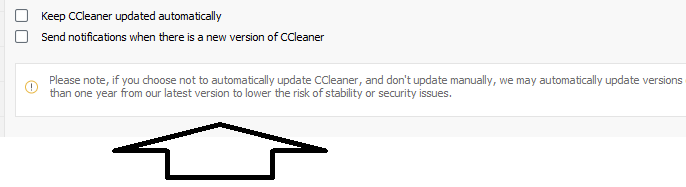
It seems I spoke too soon. While both versions were installed, I noticed today that the older version was removed during an update attempt. It seems that older versions will eventually update to the current one. See the attached screenshot for reference. At this point, we have two options: continue providing feedback for changes, or adjust to the newer versions.
2 Likes
Dear CCleaner Team,
I have an idea that might enhance the user experience and potentially drive future sales. Inspired by the approach Microsoft used with Windows XP, why not offer customers the option to choose which version of CCleaner they prefer within the same app? For example, you could add the new color scheme, font, and other design updates to the existing Version 6, allowing users to toggle between Version 6 and Version 7.
I understand this would require significant changes to the codebase, but I believe it could offer a unique, customizable experience for users. Over time, as users gradually adapt to the new version, you could phase out the older version, transitioning the interface as needed.
Just a thought, but I think it could be a great way to satisfy different user preferences while preparing for future updates.
Best regards~
I’m extremely disappointed with version 7 update. I was ccleaner user for 15+ years. It was software which I always trusted and recommended to other people. Until v7 update.
Now it feels like malware. Uninstalled.
What’s wrong with you people?
4 Likes
Yes, the earlier version uninstalled itself on all my PCs, possibly because both versions were installed. Also, I’m curious about what the CCleaner cleaner is doing when it causes the “CCleaner is still busy with something else” message. Have they explained why this happens? This didn’t occur with previous versions, and the message can sometimes persist for over 3 minutes. At times, it stays stuck, even after all updates are applied. What exactly is it doing? I usually have to restart my PC to use the app again.
1 Like
Sombody said that when it’s “busy” like that then stopping the service clears it - and that’s certainly what Restart would do.
It’s possible / probable that ‘End Task’ in Task Manager for the CCleaner7 service would have the same effect but be quicker than a full Restart.
PS. ‘Busy’ didn’t happen previously because before CCleaner7 it was an app and not a ‘Service’.
Thanks Nuke. Yes, that is what I did and odd that the task manager and complete removal of the CC Task did not remove the error message and not able to use. Than, I did the restart. I did do a troubleshoot over to CCleaner using the support tool.
Creating an account to join the chorus. I agree with everything above. One of my complaints is gutting the startup manager. It doesn’t show everything, including ccleaner itself, and there used to be a separate tab to disable startup services – it’s gone. With that and everything above, I’m uninstalling and won’t rollback because CCleaner forces an auto-update after a year, so the effort to rollback is useless.
2 Likes
I’m doing my best to be fair, as I understand that implementing upgrades to a process that many are accustomed to can be challenging. However, I haven’t seen any updates or progress regarding the feedback from the team. They did respond quickly when I reached out about my subscription ending and the upcoming charge, despite my cancellation, assuring me that everything was fine.
As mentioned earlier, I genuinely want to use version 6, but it seems the update will happen regardless. I considered using the free version since it still has the old interface, but I believe that’s also on version 7 now.
I’m also still waiting for a response from support regarding why the “Scan Now” feature for the health check is almost always unavailable, with the system being busy most of the time. What exactly is the CCleaner process doing during these intervals? It’s becoming quite frustrating at this point.
I’ve been using CCleaner Pro daily for many years. When I tried CCleaner 7 beta, I didn’t like it at all and stop using it. When Ver. 7 was automatically installed on my PC, the interface seemed to have improved a little, but I agree with all of the comments in this thread. Not only do I not like the new user interface, it doesn’t clean up as much as the previous version as others have stated. I’m sure the developers meant well, but the new version sucks and I consider it a failure on too many levels when compared to Ver. 6. I uninstalled 7, reinstalled 6.39 Pro, and disabled automatic updates. The development team needs to take a hard look at the feedback from users and consider redesigning Ver. 7 to more closely match Ver. 6 in function and in form with the original granularity. I also think the registry cleaner is a valuable tool. I have never had any issues using it in the past. I don’t like the New Coke.
3 Likes
I agree
I wish they would allow results videos. I followed the same processes to include internet junk twice—first cleaning with V6 and then with V7. The difference in clean rate and registry cleaning was amazing, with V6 performing much better. I also noticed that V6 identified 5 programs for uninstallation that V7 did not show. I really hope they make some improvements. I will do what I can to get used to this.
1 Like
Just throwing a thought out there…
You are aware that billions of people worldwide have never heard of CCleaner? and have never used it or any other cleaning/Optimisation app?
They are all using their computers quite happily, with none of the issues that are being shouted about here.
We all have the same choice.