Can't open CCleaner portable

This has been quite confusing. First, I have CCLeaner portable v639. I selected “Run CCLeaner” from the recycle bin context menu. Worked normally.

Then, I wanted to check for a CCLeaner update, so I selected “Open CCLeaner, from the recycle bin context menu, but this happened. Several times

I opened my CCLeaner directory to open it from there. Same problem.

I came here to report. It said my credentials were not correct (I have a password manager). I then selected “Forgot Password”. I used the same password when replacing. It was accepted.

Then, along the way, this happened

I then selected 'bug report" forum link. I was taken to a page that said I was “denied access”.

Finally, I arrived here.

Firstly - If you are opening CCleaner from the Recycle Bin then it is installed and not portable.

(Portable apps do not add themselves to any menus).
It is quite possible to install a ‘Portable’ app if you want to. (Or sometimes by mistake, or sometimes because it isn’t truly portable).

Secondly your screenshot shows that it has updated itself to CCleaner7 (which can’t be opened from the bin in any case).

If you want to go back to v6.39 then follow ALL of the instructions here:
How to Roll Back from v7 to v6.39
You MUST follow the instructions and turn off automatic updating straight away or it will just update to CCleaner7 again.

Sorry, don’t know why the quotes are not being implemented properly.

@nukecad

Forgive me. I’m sure your expertise is far greater than mine, but I’m forced to dispute your facts, as well as your assumptions about me

[quote=“nukecad, post:2, topic:158548, full:true”]
Firstly - If you are opening CCleaner from the Recycle Bin then it is installed and not portable.[/quote]I’ve been using CCleaner, literally daily, for many, many years. Only the portable version. I know the difference

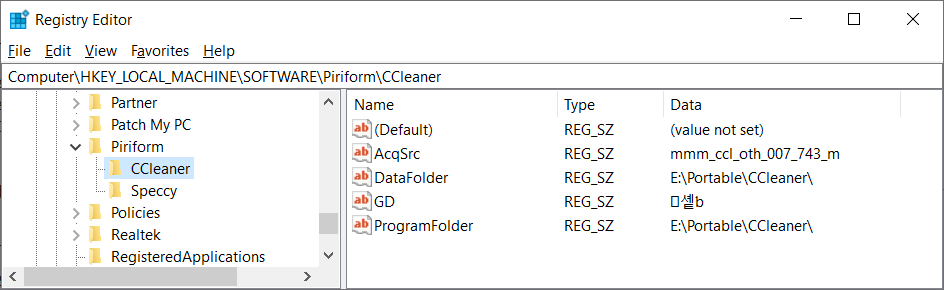
As we can see, from my uninstaller program, CCleaner is not installed

This is the unzipped folder. I added the zip file to confirm the source of that directory

[quote=“nukecad, post:2, topic:158548, full:true”](Portable apps do not add themselves to any menus)[/quote]Please explain the following

Please observe the enabled settings

and the recycle bin

and the result of selecting “Run”. The yellow dot is the indication that it is “running”

CCLEANER SYSTRAY2

I have no idea how you arrived at that conclusion. I’ve been using CCleaner portable v6.39 since the middle of October.

This mess didn’t start until yesterday. CCleaner 7 is never mentioned, much less updated itself to V7, which as we know does not exist as a portable those images are asking me to install. It doesn’t tell us what it intends to install. I’ve never seen anything like that from CCleaner before.

I tried a fresh install of the CCleaner portable 6.39. The identical problems reappeared..

I keep past versions of CCleaner portable specifically for situations like this. I just replaced the problematic v6.39.11548 portable with v6.22.10977 portable. As a result, All the problems have disappeared.

Finally, I’d appreciate an explanation for this. Whenever I open the CCleaner portable interface, it will notify me if an update is available. It is my option to update, or leave things as they are.

Now, unlike before, we can see the updated version being offered. From a CCleaner portable interface, I’m being offered an update to the latest CCleaner install v7.00.1010.

In case there was any doubt.there is no portable v7.00.1010. The latest available portable version is v6.39.11548

CCleaner - Download Builds

There in all likelihood will never be a portable CCleaner 7. 7 Runs as a windows service now. portables don’t have services or they aren’t portable. While my question during the beta was answered

So it’s sounds unlikely there will be portables beyond v6.39.11548, correct.

Can I also assume that this recent inability to open it and the prompt to install v7.00.1010 was implemented just recently, well after the original release of v6.39.11548, which led to my confusion about the behavior and my reason for posting here.

Is there any way I can disable the update message and go back to using v6.39.11548 like before?

Can someone please tell me how to fix the “quoting” display here? All I did was to select “Quote whole post”

I fixed it but not sure why it breaks for you. Try highlighting all or part of my post and choose quote
image

that’s how i read it, yes.

Didn’t work.

You need to leave a space or even a new line (enter key) after the closing quote

[quote=“noomelub, post:8, topic:158548”]
Didn’t work.
[/quote]if you don’t it breaks it like this

Just because you download the Portable from the Builds page, doesn’t mean that you haven’t installed anything when you ran it.

It has been the case for some time (a few years at least) that CCleaner Portable has not been truly portable, and if you unzip it onto your computer rather than to a USB stick then it will install itself.

It will create registry entries etc, - Which, among other things, is how you get the recycle bin context menu, and the automatic updating.

A truly portable app does not install anything on your computer.

There are many threads and posts on this forum about it.
@lmaci is our expert user on matters CCleaner portable, and may want to add something better that I’ve explaine it.

In the meantime:

How to Roll Back from v7 to v6.39
Follow ALL of the instructions, particularly about turning off the Automatic Updating.

Hi noomelub:

I run CCleaner Free Portable v6.39 from a removable USB stick, I only keep the minimum CCleaner files required to run a few basic CCleaner functions (e.g. Custom Clean, registry cleaner, System Restore tool, etc. - see my 08-Oct-2025 post in my topic Builds Download Page Offering Outdated CCleaner Portable v6.39) and I’ve created custom inbound and outbound traffic blocks for CCleaner64.exe in my Windows Firewall (see the How-To Geek article How to Block An Application from Accessing the Internet with Windows Firewall) so my Portable build might behave differently than yours.

That is not my experience. If I plug in my USB stick and right-click on the Recycle Bin icon on my desktop I can confirm that “Open CCleaner” will correctly launch CCleaner and that “Run CCleaner” will execute a Custom Clean with my current Custom Clean settings.

If I recall correctly (and I might not), unzipping the portable ccsetup6xx.zip file on my hard drive and running CCleaner64.exe from that location has never “installed” CCleaner in C:\Program Files, but I know this does add lots of unnecessary garbage on your system. My 21-Jul-2023 comment in Wisewiz’s Welcome back to CCleaner Professional ??? might provide some context about the registry entries that can be created by CCleaner Portable.

I am very careful NOT to unzip the portable ccsetup6xx.zip file and run the bundled CCleaner.exe or CCleaner64.exe executables from my hard drive because of all the extra garbage this adds to my Task Scheduler and registry. I always run CCleaner64.exe from my USB stick and when I checked my registry today:

  • The registry key at HKEY_LOCAL_MACHINE\SOFTWARE\Piriform\CCleaner had only 4 registry values
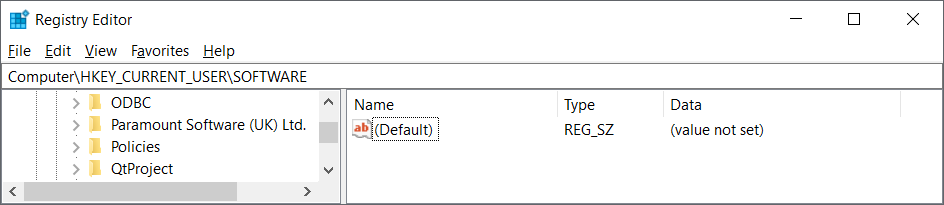
  • The registry key at HKEY_CURRENT_USER\SOFTWARE\Piriform\CCleaner was not present

NOTE: As far as I can tell I do NOT have any registry values specifically related to “Open CCleaner” or “Run CCleaner” that must be present in order for these context menu items to run correctly from my Recycle Bin icon.

Both my settings at Options | Updates are disabled (see image below), my setting at Advanced | Save All Settings to INI is enabled, and I have never clicked the “Try our new CCleaner” button in my CCleaner Free Portable v6.39 GUI that would install CCleaner v7.x on my hard drive, so I have no idea what steps must be taken to remove the last remnants of an installed edition of CCleaner v7.x off a user’s system. If you are absolutely certain that there are no traces of Cleaner v7.x left on your system after your Control Panel uninstall then I’d suggest you try a clean reinstall of CCleaner Portable v6.39 (see my Dec 2024 topic How to Remove Last Traces of CCleaner Free Portable v6.x?) and see if that fixes your CCleaner Portable issues.

NOTE: Unwanted bloat like Driver Updater (CCleanerDU.dll) and Bug Reporter (CCleanerBugReporter.exe) are missing from my CCleaner Portable GUI because I deliberately delete the \x86 and \x64 subfolders after unzipping the portable ccsetup6xx.zip file.

NOTE: A software removal tool like the 30-day trial version of Revo Uninstaller Pro might be able to perform a “forced uninstall” to remove the last traces of CCleaner v7.x off your system if any orphaned disk files or registry entries were left behind after the Control Panel uninstall.


Dell Inspiron 15 5584 * 64-bit Win 10 Pro v22H2 build 19045.6456 * Firefox v144.0.2 * Microsoft Defender v4.18.25090.3009-1.1.25100.9002 * Malwarebytes Premium v5.4.3.221-144.0.5414 * Macrium Reflect Free v8.0.7783 * CCleaner Free Portable v6.39.11548 * HDCleaner Portable 64-Bit v2.091

Thanks for the insights.

I’d say we each have different definitions of “install”.

To me if any app puts ‘stuff’ on your computer and/or changes and adds reg entries then that is “installing”, whether or not it leaves its executable behind it has still installed stuff.

To me a truly Portable app leaves nothing behind when you close it - except for anything that you used it to create.

Hi nukecad:

As a general rule I do not I consider software to be installed unless it creates the program’s .exe executable and uninstaller (e.g., uninstall.exe) in C:\Program Files or C:\Program Files (x86) and lists the installed program at Control Panel | Programs | Programs and Features and/or Settings | Apps.

In an ideal world a portable app should never create a registry entry, but CCleaner Portable is not the only portable app I use that ignores this “best practices” rule. For example, see software developer Tigzy’s 10-Jul-2025 post # 1691 in the topic UCheck - Update your software in 2 clicks in the Wilders Security forum about how their UCheck Portable app creates registry entries in HKEY_CURRENT_USER\SOFTWARE\Adlice Software\UCheck.


Dell Inspiron 15 5584 * 64-bit Win 10 Pro v22H2 build 19045.6456 * Firefox v144.0.2 * Microsoft Defender v4.18.25090.3009-1.1.25100.9002 * Malwarebytes Premium v5.4.3.221-144.0.5414 * Macrium Reflect Free v8.0.7783 * CCleaner Free Portable v6.39.11548 * HDCleaner Portable 64-Bit v2.091 * UCheck Free Portable 64-Bit v6.4.2.0

1 Like

I’ve been a CCleaner user for over ten years. I’d like to offer some constructive criticism.

This situation has not been handled with the appropriate forethought, and has created unnecessary confusion. Not just by you, but in general

I appreciate your input, but your responses left me with questions, and doubt.

I was using CCleaner as I normally do. I ran the cleanup, from the recycle bin, after which, I decided to open the CCleaner interface from the recycle bin. Ironically, to check for an update..

At which point, instead of opening up CCleaner, I was asked to install something. Something unidentified, which was prompted by/related to a portable version of CCleaner.

I have never seen any activity of this sort associated with any portable version of anything.

And then, on top of all that, You said “your screenshot shows that it has updated itself to CCleaner7

Which is categorically unsubstantiated due to the fact there was no such indication of that in those images.

Just for the sake of discussion, If I already had v7 installed, the latest version of CCleaner, why was I being asked to install something? Particularly, something unidentified, and with no explanation why?

Knowing that, don’t you think it would be incumbent on your part, reasonably, to qualify your statement with something both parties can relate to? You didn’t explain how you arrived at your conclusion, when you had to know any user encountering this scenario was being led thru this thing blindly.

I have no intention of installing anything. At least, not in the conventional sense, registry changes not withstanding.

My solution was to revert back to v6-36-0-11508 portable, which I found was the latest version that would allow me to utilize it without any of these complications.

Hi noomelub:

The first CCleaner Portable v6.39 image you inserted in your original post <above> showing the blue Install button to upgrade to a “standard” (installed) edition of CCleaner v7.x is almost identical to the image shown in Trooper’s 17-Oct-2025 post # 55 in the topic CCleaner v7 in the Wilder Security forum, except that your image does not show an “X” in the top-right corner to close this pop-up ad and ignore the offer to upgrade to CCleaner v7.x. From Trooper’s post:

If you did not see the “X” to close this annoying pop-up ad while using CCleaner Portable v6.39 it’s possible that minimizing / maximizing your CCleaner window, hitting your ESC key, or adjusting your screen resolution would have allowed you to close this annoying pop-up ad and proceed using CCleaner Portable v6.39 as you normally would.

See my post # 56 in that same Wilders topic about similar pop-up ads I’ve seen in CCleaner Free Portable v6.34 and higher nagging me to purchase a Pro subscription or upgrade to CCleaner v7.x. AFAIK there is no way to stop these large pop-up ads from appearing in CCleanar v6.x that cover the entire GUI - all you can do is close them and move on (or stop using CCleaner altogether and use a less intrusive disk cleaner app like I have).

EDIT:

I should add that when these large pop-up ads appear in my CCleaner interface it always happens immediately after I run a Custom Clean. I assume that’s why you saw your own pop-up ad appear after clicking the “Run CCleaner” option from your Recycle Bin context menu - because this silently runs a background Custom Clean without having to open CCleaner.
_______________

Dell Inspiron 15 5584 * 64-bit Win 10 Pro v22H2 build 19045.6456 * Firefox v144.0.2 * Microsoft Defender v4.18.25090.3009-1.1.25100.9002 * Malwarebytes Premium v5.4.3.221-144.0.5414 * Macrium Reflect Free v8.0.7783 * CCleaner Free Portable v6.39.11548 * HDCleaner Portable 64-Bit v2.091

There is a portable version of CCleaner, it’s not an official version. However, as I posted in the bugs section, 6.39.11548 has started acting up recently.

Hello lmacri,

I thought I already explained everything thoroughly. Let’s close the door on this pop-up thing, and the sequence in which things actually occurred,

As I previously mentioned, several times, that screenshot I posted of the install prompt did not happen after the “Run” from the recycle bin menu. In fact, the “Run” proceeded normally.

After the “Run”, I chose “Open CCleaner” from the recycle bin menu. That is when the pop-up prompt appeared

[quote=“lmacri, post:15, topic:158548, full:true”] your image does not show an “X” in the top-right corner to close this pop-up ad and ignore the offer to upgrade to CCleaner v7.x. From Trooper’s post:

hitting your ESC key, or adjusting your screen resolution would have allowed you to close this annoying pop-up ad and proceed using CCleaner Portable v6.39 as you normally would.[/quote]

I can only relate my experience. There was no alternative to “ignore” that offer for me.

You mentoned the missing “close button”. The image of that pop-up install prompt was a cropped/edited version of the original. I was posting a lot of images. I was trying to be less intrusive. Here is how the original appeared, including the close button

and this is what happened after selecting the close button.

My only alternative to installing was to QUIT. which did not lead to the opening of the CCleaner interface.

Following that, whether I tried to open the CCleaner interface from the recycle bin menu, or go directly to CCleaner64.exe in it’s portable "instatl’ directory, I was no longer given access to the CCleaner interface. Both options just repeated the install prompt message.

I am not a disgruntled user. I have appreciated the use of CCleaner for years. Initially, my sole intention here was to find out what this completely unique and totally unexpected sequence of events was about.

Now I now know that a portable version is a thing of the past.

Given that, I thought it was important to constructively point out that there should have been en explanation included, best done, IMO, within that pop-up informing users with something like “you are seeing this alert/instruction/prompt because” etc., etc. Not to mention any other means of informing the public, i.e. email, etc.

Does that sound reasonable?

Hi noomelub:

I don’t know of a single CCleaner customer posting in this forum who felt the rollout of CCleaner v7.x was handled in a responsible or reasonable manner by Avast / Piriform. To date the only official communication I’ve seen is the 07-Nov-2025 topic Explore What’s New in CCleaner 7 that was pinned at the top of this forum over a month after the v7.x rollout started.

I’m not an Avast / Piriform employee so I can’t tell you if the sequence of events you saw is “normal” for someone running a licensed edition of CCleaner Portable v6.39 from their hard drive instead of a removable USB stick. Unfortunately, the Avast / Piriform employees have stopped engaging directly with customers in this forum, and instructions in employee Laurence_CCleaner’s 22-Oct-2025 post in LarsErikOsterud’s Thunderbird missing from Custom Clean in the new version (and re-posted in a variety of other topics on CCleaner v7.x) state :

Please submit your feedback via the Ideas Portal, located in the left-hand menu of the application. This helps us gauge interest and prioritize enhancements based on user feedback.”

I appreciate your frustration, but if you want to provide feedback to Avast / Piriform about your experience with the CCleaner v7.x rollout it sounds like you’ll either have to install CCleaner v7.0 first and then submit your comments from the application’s main interface, or try contacting CCleaner support using their online contact form at https://support.ccleaner.com/s/contact-form?language=en_US&change=true&form=general and hope someone replies (see nukecad’s 06-Nov-2025 warning <here> about the Live Chat option).


Dell Inspiron 15 5584 * 64-bit Win 10 Pro v22H2 build 19045.6456 * Firefox v144.0.2 * Microsoft Defender v4.18.25090.3009-1.1.25100.9002 * Malwarebytes Premium v5.4.3.221-144.0.5414 * Macrium Reflect Free v8.0.7783 * CCleaner Free Portable v6.39.11548 * HDCleaner Portable 64-Bit v2.091

Hi lmacri,

Because of the way things were handled, I’ve paid the price for continued attempts to use CCleaner. Not in cash, but in aggravation.

I use Firefox. For a while now, I’ve been having ongoing problems with having to constantly log into websites that I had set up not having to remember me.

Today, I opened the browser to find all my history wiped out. That’s not the first time. Although it does not happen every time I launch Firefox, I believe the reason, that I just discovered, when in the CCleaner interface, you are notified that you must close the browser for CCleaner to do it’s work related to the Firefox settings.

Now I know why. Long ago, I set up the CCLeaner settings, and, among other things, unchecked everything Firefox related.

Somehow, after I posted, when trying to get CCLeaner to work normally, I mentioned here trying an earlier portable version. My typical routine is to replace the current stuff in the portable install directory, but retain the original ccleaner.ini.

I should have figured a sooner that, somehow the ccleaner.ini reverted to it’s default. I supposed it’s possible I made a mistake, but I’ve done this so many times in the past when updating CCLeaner, and I know what the consequences are for not doing so.

Wouldn’t you think it might be a thoughtful idea, common sense, consideration for the user, to prompt that same disclaimer when you are running CCleaner from the recycle bin? How could you not? How is a user supposed to know such an important fact that could negatively impact their workflow, like me.