Hi noomelub:
I run CCleaner Free Portable v6.39 from a removable USB stick, I only keep the minimum CCleaner files required to run a few basic CCleaner functions (e.g. Custom Clean, registry cleaner, System Restore tool, etc. - see my 08-Oct-2025 post in my topic Builds Download Page Offering Outdated CCleaner Portable v6.39) and I’ve created custom inbound and outbound traffic blocks for CCleaner64.exe in my Windows Firewall (see the How-To Geek article How to Block An Application from Accessing the Internet with Windows Firewall) so my Portable build might behave differently than yours.
That is not my experience. If I plug in my USB stick and right-click on the Recycle Bin icon on my desktop I can confirm that “Open CCleaner” will correctly launch CCleaner and that “Run CCleaner” will execute a Custom Clean with my current Custom Clean settings.

If I recall correctly (and I might not), unzipping the portable ccsetup6xx.zip file on my hard drive and running CCleaner64.exe from that location has never “installed” CCleaner in C:\Program Files, but I know this does add lots of unnecessary garbage on your system. My 21-Jul-2023 comment in Wisewiz’s Welcome back to CCleaner Professional ??? might provide some context about the registry entries that can be created by CCleaner Portable.
I am very careful NOT to unzip the portable ccsetup6xx.zip file and run the bundled CCleaner.exe or CCleaner64.exe executables from my hard drive because of all the extra garbage this adds to my Task Scheduler and registry. I always run CCleaner64.exe from my USB stick and when I checked my registry today:
- The registry key at HKEY_LOCAL_MACHINE\SOFTWARE\Piriform\CCleaner had only 4 registry values
- The registry key at HKEY_CURRENT_USER\SOFTWARE\Piriform\CCleaner was not present
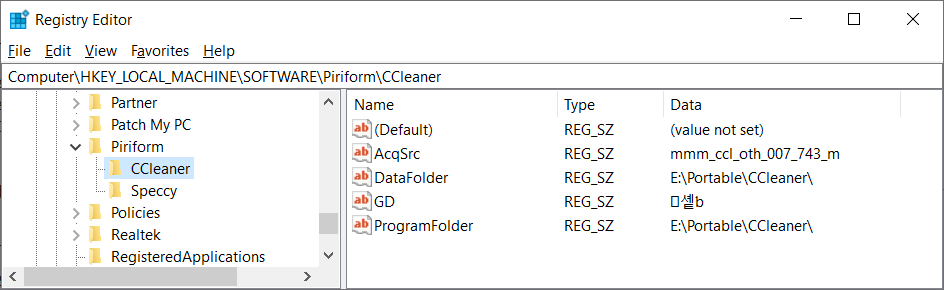
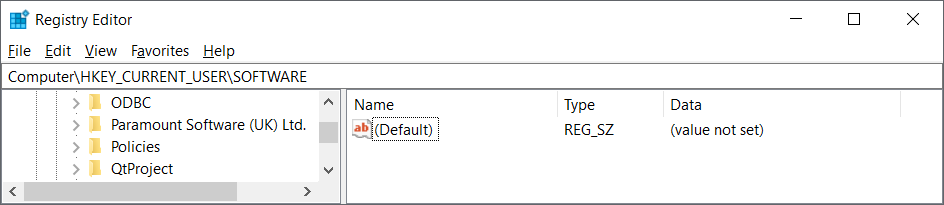
NOTE: As far as I can tell I do NOT have any registry values specifically related to “Open CCleaner” or “Run CCleaner” that must be present in order for these context menu items to run correctly from my Recycle Bin icon.
Both my settings at Options | Updates are disabled (see image below), my setting at Advanced | Save All Settings to INI is enabled, and I have never clicked the “Try our new CCleaner” button in my CCleaner Free Portable v6.39 GUI that would install CCleaner v7.x on my hard drive, so I have no idea what steps must be taken to remove the last remnants of an installed edition of CCleaner v7.x off a user’s system. If you are absolutely certain that there are no traces of Cleaner v7.x left on your system after your Control Panel uninstall then I’d suggest you try a clean reinstall of CCleaner Portable v6.39 (see my Dec 2024 topic How to Remove Last Traces of CCleaner Free Portable v6.x?) and see if that fixes your CCleaner Portable issues.

NOTE: Unwanted bloat like Driver Updater (CCleanerDU.dll) and Bug Reporter (CCleanerBugReporter.exe) are missing from my CCleaner Portable GUI because I deliberately delete the \x86 and \x64 subfolders after unzipping the portable ccsetup6xx.zip file.
NOTE: A software removal tool like the 30-day trial version of Revo Uninstaller Pro might be able to perform a “forced uninstall” to remove the last traces of CCleaner v7.x off your system if any orphaned disk files or registry entries were left behind after the Control Panel uninstall.
Dell Inspiron 15 5584 * 64-bit Win 10 Pro v22H2 build 19045.6456 * Firefox v144.0.2 * Microsoft Defender v4.18.25090.3009-1.1.25100.9002 * Malwarebytes Premium v5.4.3.221-144.0.5414 * Macrium Reflect Free v8.0.7783 * CCleaner Free Portable v6.39.11548 * HDCleaner Portable 64-Bit v2.091