And people ask why I don't like Apple...

I bet there are a few Microsoft haters who are probably thinking just how lucky they are not owning a Mac. ;)

Richard S.

I am sure I am like others.

I am not a hater, just dislike having to learn how:

- New file systems work (compression formats/command lines etc)

- New programs install

- Locations of said new items

- How to clean trash from new systems

- How to combat malware/viruses (all over again... IE, what is their hosts file, or do they have one? what location can malware hide? do they have the BHO equivalent? how secure is their web browser?)

- What video/sticky/notes/etc programs they have

- Can you even use what is on this new OS for school (some require 2007 for the doc format, unless you use an alternative after you research some)

There are many, many problems plagued with a newer os that I don't even care to discuss, such as:

- How/where do they store their drivers?

- Driver backup programs? Free?

- Video/picture editing programs that work as good as in windows?

- How do shortcuts work?

- How to make SFX in newer OS?

It is mindboggling.

If you don't do a lot, its ok.

Obviously, the more you specialize in, the more there is to learn, & therefore, it is far more complex!
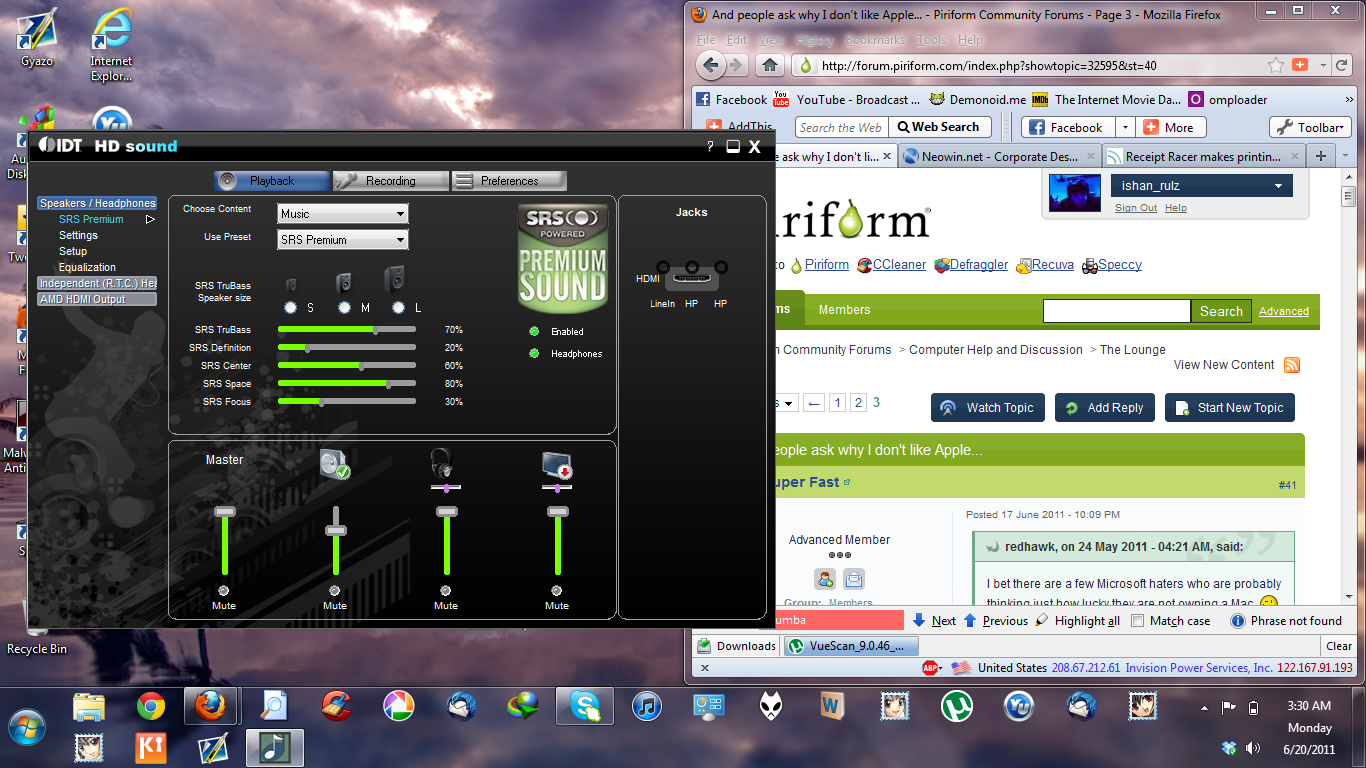
While I agree Super Fast that learning each new Windows version we're graced with can be a learning curve for late adopters it's easy to just search for answers.

While I agree Super Fast that learning each new Windows version we're graced with can be a learning curve for late adopters it's easy to just search for answers.

Andavari, its NOT a learning curve if you only do a few things like most people. IF however, you spend years collecting the best software programs out there, and each generation of Windows, you have to continually prune back programs that work great on an older os & find another that tries to work somewhat as good, you will appreciate this.

But alas, all most people want is Windows Paint, Wordpad, & a few games + internet. Who creates games anymore? Who does complex SFX programs any more? Who really does anything anymore, LOL!

________________________________________________

Edit: I know you don't know what I am talking about, so I will give you an example.

________________________________________________

On older Windows 95/98/ME systems, the audio was direct access. No problem.

In XP, it was HAL. Still no problem.

Windows Vista? 7? While they have many great features built in, they left out a huge one... My creative card worked great under XP & had great treble/bass control. Guess what happens when you upgrade to Vista/7? You lose the ability to fine tune your bass or treble. This is what makes great audio!

Ok, so I went out & got a new audio card, & this one has a software control that allows me to use it somewhat, but still not as good as the old card...

You see what I mean? Windows is continually getting "dumbed" down, & stripped of features!

Windows is continually getting "dumbed" down, & stripped of features!

I don't actually agree with that. Things change in life all the time, and that includes Windows. We all look back over our shoulders and see the rose-tinted meadows behind us.

Years ago when just a small minority used computers they were mainly people who *wanted* to use them. Now, people *need* to use them. For their jobs, to stay in touch with family and friends, and just to be like everyone else. And computers and operating systems have had to evolve to deal with that.

Some features are now hidden to protect users from themselves, however those who want to, can still meddle :)

I don't actually agree with that. Things change in life all the time, and that includes Windows. We all look back over our shoulders and see the rose-tinted meadows behind us.

Years ago when just a small minority used computers they were mainly people who *wanted* to use them. Now, people *need* to use them. For their jobs, to stay in touch with family and friends, and just to be like everyone else. And computers and operating systems have had to evolve to deal with that.

Some features are now hidden to protect users from themselves, however those who want to, can still meddle :)

Some things I agree with, some I don't.

Take for instance, the built in notes program for 7. Great

Built in weather app. Great

Updated time control, whatever, Great (but where's the alarm feature, lol!)

Some things I DON'T agree with are, while the audio is nice being able to control application audio, it is NOT great to lose bass/treble controls, because I can tell you, creative has some of the best sounding audio cards out there. I used a lot. I haven't tried a Xonar one yet, but I intend to one day.

I also don't like the way you can't set Windows to exclude a single app from UAC controls (say, locate32 set to start on startup, & it asks you every time).

I like the way drivers can scan in multi-level folders when you are restoring them, instead of manually having to find which one it is.

Some things are better, some things are worse.

If I recall correctly, Trusted Computing Platform (anti copy tech) was foisted as a "feature" instead of a crippled windows, as were many other "lockdowns".

There are many others that are far too detailed to list here...

Makes no sense at all to me, since the very first time something is in human readable or audible format, it is already bypassed.

I have no idea why they even bothered with that. You can't lock knowledge up.

Anyway, the main things I don't like about 7, are the way they took audio controls away from users (bass/treble) & now I have to use a manufacturer application instead to run it through... What were they thinking? That wasn't a feature! LOL!

I just hope Windows 8 isn't even MORE "less" functional! Hahaha!

Apple going too far?? http://www.bbc.co.uk/newsbeat/13814378

Richard S.

Now, people *need* to use them.

Where I live you now have to have a computer, or know someone that will let you use theirs just to get some yearly taxes information which isn't available at a physical location anymore.

Apple going too far?? http://www.bbc.co.uk/newsbeat/13814378

Richard S.

Good thing they'll know where all of the iPhone users are, eh? :lol:

Good thing they'll know where all of the iPhone users are, eh? :lol:

How awful, LOL!

Anyway, just to let you know, I was playing with windows 7 & just discovered 2 new reasons I hate it!

When viewing an image in Windows 7, it will NOT:

- Play GIF animations (internet explorer is used for this)

- Enlarge smaller images without pixelation

Anyone know why this is?

I hate to think XP is more advanced than Windows 7, because after all, Windows 7 does contain some great features & updates.

Anyone got a solution to my problems in 7?

For the record, in XP, images enlarge with no pixelation & the default image viewer does play gif animations...

Is there any way to force 7 to stop pixelation & get it to play gif animations?

See here to play gifs

http://www.sevenforums.com/music-pictures-video/39095-animated-gifs-windows-photo-viewer.html

There are 8 pages of thanks to the dev of the little app.

I think that is something which the OS doesn't handle itself, check your manufacturer' driver/software page.

65f6fbb37216a91a99a7187c974ba6ab.png

See here to play gifs

http://www.sevenforums.com/music-pictures-video/39095-animated-gifs-windows-photo-viewer.html

There are 8 pages of thanks to the dev of the little app.

That little app works fine in Win XP also. :-) Hazel, you are amazing.

Pin a few more things to your super bar, Ishan! :lol:

Maybe a third thunderbird icon!

Pin a few more things to your super bar, Ishan! :lol:

Maybe a third thunderbird icon!

lool, I seldom see my desktop, I always have some window maximised, and those pinned things are mostly all I use most of the time. And the two thunderbirds are Version 3 and 5 BETA respectively. :P

That little app works fine in Win XP also. :-) Hazel, you are amazing.

I tried it & I wasn't too impressed.

In XP, you can view gifs in the same viewer that shows pictures.

In 7, you have to do it in internet explorer/firefox/whatever.

Ideally, I hope to find a solution to re-integrate this...

Maybe I will find it one day.

I tried it & I wasn't too impressed.

...

In 7, you have to do it in internet explorer/firefox/whatever.

As an experiment, I set it as the default gif viewer in XP and it worked better than the oem viewer.

Don't know how to set default apps in w7, but might work better if you do. :)

In Windows 7 you can access setting up defaults in the Start bar where it says Default Programs.

In Windows 7 you can access setting up defaults in the Start bar where it says Default Programs.

It's easier just to right click/open with/always use.

That is the simplest.

Other than a registry import of a saved export.

I think that is something which the OS doesn't handle itself, check your manufacturer' driver/software page.

65f6fbb37216a91a99a7187c974ba6ab.png

Edit: I have realteq HD sound. That was the first thing I tried, but on this particular system, it did not enable bass/treble controls.

I hate running media player with the controls on it, because that only changes the music/vids your playing through media player.

When your playing games/youtube/system sounds etc, it has 0 effect on those when you change settings in WMP.

*Bang head here!

Sounds like what you want is a very good speaker set-up with treble/bass controls on the main speaker/console. I have kinda cheap speakers but I can control bass (not treble).