I agree that Pro 7 is unwelcome, and i have successfully reactivated 6.39. However, as others have mentioned, attempts by CCleaner to download 7 continue, despit multiple deletions of relevant files. In particular, I have been unable to delete CCleaner\temp_update, through CC or otherwise.
Users become pissed off when the geeks insist that their way is the only way, and that is what is happening here. There are other cleaning apps, and it is time to turn to them.
Thanks for the 6.39 installer. I still wonder why my Pro upgrade has been deleted when upgrading to v7. Do we have to pay every time there is an upgrade?
Edit: I installed 6.39 but every time I try to launch it I only get a window that demands I upgrade to v7. How do I stop this.
I receive a popup at least once a day to update to 7, despite my best efforts to delete any files related to an update. Why is this happening? How can it be stopped?
Will I receive a refund for time remaining on my subscription if I cancel CC now?
The issue is… that I can’t get to that page. All I get is the update to v7 window nag. Version 7 wants me to pay again for my subscription that’s only 1 month old. Very disappointed.
Thank you for the advice, but I had already unchecked the boxes you mention, to no avail. I also have deleted two files contained in a “temp_ccupdate” folder, one of which appears to be the v.7 update, but again the popup doesn’t stop..I have now deleted that folder, along with the “setup” folder which contained only one file with a .def extension, and I will post again if there is anything positive to report.
Uninstall the CCleaner apps currently installed on your machine. you might have both CCleaner 6 and CCleaner 7 installed.
Go to C:\Program Files and delete the CCleaner folder and the Piriform folder.
Restart (not Shutdown) your machine.
Now try installing CCleaner v6.39 again, running ccleaner from the installer when it asks and turning off the automatic updating.
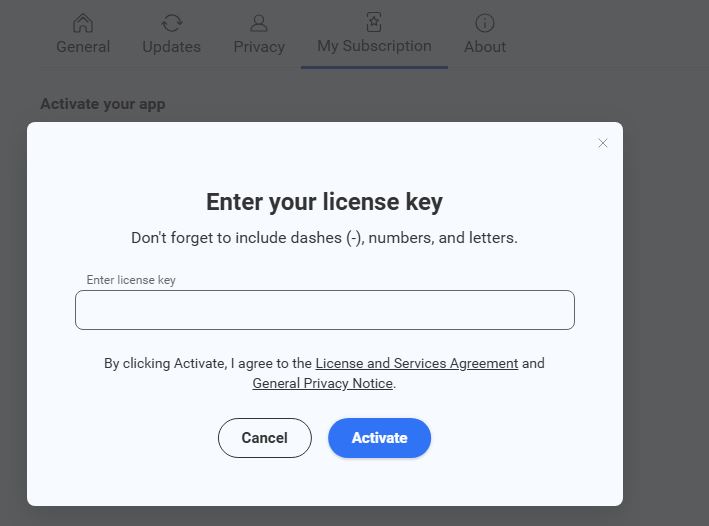
PS. We have seen instances of CCleaner7 not picking up existing licences and asking for activation, but if you already have a licence you can just go to Settings > My Subscription and enter your existing key to activate it.
For me, this worked. V6 will recognize my activation code, but v7 still will not. As long as I can stay away from v7, CCleaner will work for me. Thanks for all the help.