When I use CCleaner Pro > Health Check > Scan this PC, and it’s done scanning and cleaning, although I’ve spent hours on my “Keep Cookies List”, most sites I visit get me signed out. I thought the whole purpose of the Keep Cookies List was so these sites would remember me, and when a restart, or in CCleaner’s case, Scan then Clean this PC, which will close Chrome, when I come back, when done cleaning, most tabs I must sign in again. Why is that?
Hi @dadybear1234 let’s see if we can work out what’s happening.
Firstly although you say you are telling CCleaner to keep the cookies do you have the browser itself set to clear them on closing?
Look in your browser settings for one like this, most browsers have one:

If you have that option enabled the even if CCleaner has been told not to clean the cookies just closing the browser means the browser itself will clear them.
Try closing (quiting) and then re-opening the browser (without using CCleaner) to see if that has logged you out of the tabs.
Next, are you using Custom Clean as well as Health Check?
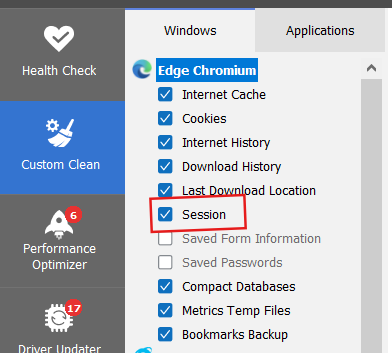
If so then, although both will skip the cookies you have told it too, there is another Custom Clean setting that can clear logins.
It’s “Session” for the browser and if ticked then running a Custom Clean will clear the browsers ‘session’ which can log you out of websites.
eg. for Edge:
If its neither of those then can you post a screenshot of your ‘Cookies to Keep’ list from Options>Cookies along with an indication of some of the sites you get looged out of?
Hello @nukecad, The browsers Chrome and Edge are not set to clean on closing. About once a week, I like to review any new cookies that may be added to the cookie list. The only thing that’s set to clean on closing is cache. I will check out any new cookies then after saving them to the Keep Cookies list I will clean what’s necessary as I close or restart the browser. The settings for Sessions I don’t have checked unless a user has to go into the Windows section every time before cleaning because they don’t stay the same (the settings in that Windows section) then that’s not it. Therefore I believe I’m doing everything correctly. However, I do have a question. Why have a Keep Cookies list if, when a user cleans Chrome (let’s say of everything), why the Keep Cookies list? I always assumed that was what it was for. Like an emergency backup. So, if a user clears cookies when closing, does that keep the Cookies list in CCleaner Pro become useless forever? Thank you for your attention to what it is matter.
Yes if your browser is set to clear cookies. history, etc, on closing then once it is closed and has cleared them there is nothing data wise of any websites left over for CCleaner to then clean, or to keep.
However that isn’t quite the same as ‘nothing left’ - because even when the browser is set to clean itself on closing there are still a few things of it’s own that the browser likes to keep so doesn’t clear - CCleaner will still get those ones.
Can you give any examples of sites that you get logged out of even if the browser isn’t cleaning them and you have them in “cookies to keep”.
Always remembering that certain websites will always log you out after you haven’t used them for a number of minutes, eg, Banking sites, Utilities accounts, etc. will always do it for security.
Other types of site may also do it, again mainly for security,
I’m talking about sites I always stay signed in to before ever getting CCleaner. Let’s say it’s Amazon and
Netflix, I close the browser I have Amazon’s and Netflix in the Keep cookies list. I open Chrome browser, I am no longer signed into Amazon or Netflix, yet I have all they’re cookies in my CCleaner’s Keep cookie list. I’m now wondering why there is a Keep cookies list and what it is for? I thought it was for even if I clean all cookies my favorite sites the ones with a tab at the top of Chrome browser I thought it was for sites like that to keep me signed in even if I did delete they’re cookies when I cleared cache I have a Keep cookies list doesn’t that keep my cookies and allow me to stay signed in at regular websites not banking websites but all the other’s where security isn’t an issue why save any cookies at all is this funtion useless?
Keeping the cookies means that CCleaner will not touch them them when CCleaner is clearing cookies.
However whatever you set in CCleaner cannot prevent anything else, including the browser itself. from clearing them.
Thanks. I just saw this. The problem was that I was setting up a Custom Clean, then backing out. Then I would choose Health Check it would override the choices in Custom Clean. I was unaware of how that worked.