Please assist if you have a solution for this …..
Firstly have you synced your Chrome?
If you have then when CCleaner clears the browser history from your machine the syncing will just put it straight back again from the cloud, That’s what syncing does.
I don’t use Chrome to test if anything there has been changed to where/how it stores history, but browsers do change that now and again,
CCleaner v6 is no longer supported so if there has been a change to where/how Chrome stores it’s history then v6 will not be updated to reflect that change.
v7 would be updated to reflect the change, but v7 does not have the function to clean browsers on closing.
Hi MacL:
I use CCleaner v6.41.11567 on occasion but don’t have Chrome installed so I can’t test for you.
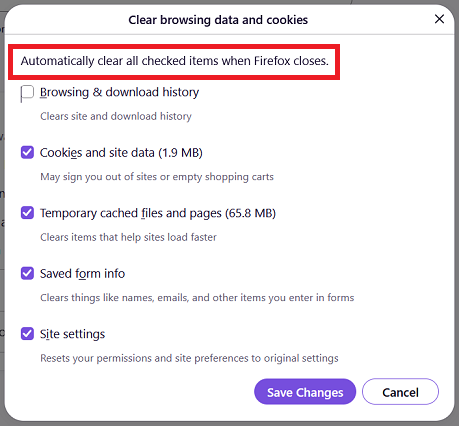
Instead of using a utility like CCleaner or HDCleaner to manage my browser cleaning I use the built-in settings in my default Firefox browser to automatically clear my browsing history on exit (see images below). If there are cookies and other site data I wish to keep for a particular site I can create a site exemption so that cookies and site data for that site are kept when I close my browser. See the section titled “How do I make Firefox clear my history automatically?” in Delete browsing, search and download history on Firefox.
I’ve configured similar settings in my Microsoft Edge browser as instructed at Manage cookies in Microsoft Edge: View, allow, block, delete and use.
For your Chrome browser, see How to Automatically Clear Browsing Data When Closing Google Chrome Window: A Step-by-Step Guide.

Dell Inspiron 15 5584 * 64-bit Win 10 Pro v22H2 build 19045.7846 * Firefox v160.0.1 * Microsoft Defender v4.18.26100.4-1.1.26100.4 * Malwarebytes Premium v5.7.3.376-167.0.5780 * Macrium Reflect Free v8.0.7783 * CCleaner Free Portable v6.41.11567 * HDCleaner Portable 64-Bit v2.096
Hi … Or open this direct link in your Google Chrome web browser to enable this feature:chrome://settings/content/siteData
Unfortunately this advice did not work

Hi MacL:
According to TheWindowsClub article How to automatically clear Chrome browsing data on exit (last updated 01-Jul-2026):
The option to Clear cookies and site data when you close all windows has been replaced by Don’t allow sites to save data on your device in the recent version of Chrome, and you will have to use this setting instead.
That article recommends you go to Settings | Privacy and Security | Site Settings | Additional Content Settings | On-device Site Data (or chrome://settings/content/siteData) and select “Don’t Allow Sites to Save Data on Your Device”.
NOTE: This is not the “Delete data sites have saved to your device when you close all windows” option recommended in the older 24-Nov-2023 Google Community Guide How to Automatically Clear Browsing Data When Closing Google Chrome Window: A Step-by-Step Guide.
If enabling the “Don’t Allow Sites to Save Data on Your Device” setting doesn’t work then try using a browser extension from the Chrome Web Store to clear your browsing history on exit. If I google “how to automatically clear browsing data when closing Google Chrome” one of the suggestions by Google’s Gemini AI is.:
Clearing Browsing History on Exit Google Chrome
Chrome does not have a standard consumer toggle to automatically delete browsing history when closing. To do that automatically, you can use an extension from the Chrome Web Store — such as Auto Clear History on Exit — which clears history on exit and lets you choose which data types or sites to protect.
Fred SR’s 14-Jul-2026 post in Browsing History in the Google Chrome forum suggests installing the “Auto History Wipe” browser extension, but a search on the Chrome Web Store at https://chromewebstore.google.com/search/“Auto History Wipe” currently finds three extensions with that name.
Dell Inspiron 15 5584 * 64-bit Win 10 Pro v22H2 build 19045.7846 * Firefox v160.0.1 * Microsoft Defender v4.18.26100.4-1.1.26100.4 * Malwarebytes Premium v5.7.3.376-167.0.5780 * Macrium Reflect Free v8.0.7783
