I have bought and paid for CCleaner PRO. This updated to CCleaner 7 Free automatically this morning and now will not accept my license key despite that I paid for pro. How do I get PRO back?
Like all the previous versions CCleaner 7 can be either Free or Pro.
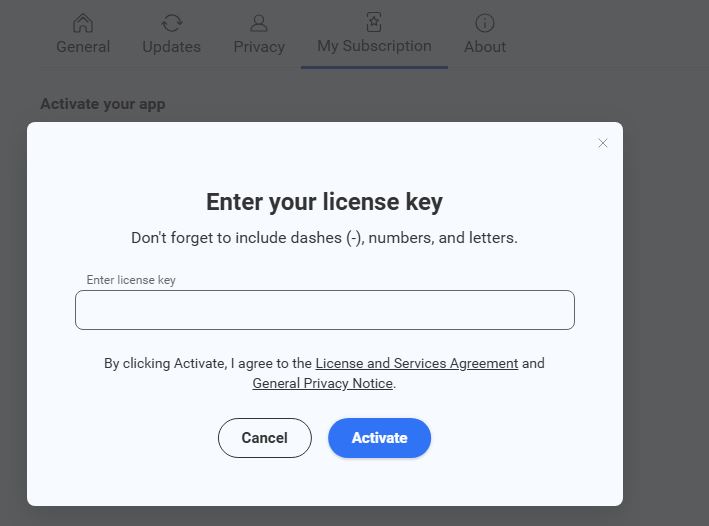
Go to Settings > My subscription and it will tell you if it is activated as Pro.
If it isn’t then enter your existing licence key to activate it as Pro.
Make sure that you are not mistyping your key.
(8 instead of B, and so on).
1 Like
I must have mistyped more than once, as it worked no problem this time. Thanks!
“No subscription information for this can be found” and I see no way to have entering a license key in the settings on cleaner number seven pro
If it’s already activated as Professional then you have no need to enter your key again.
So it won’t show you an option for something that isn’t needed.

If it hasn’t already been activated as Professional then:
Settings > My Subscription > Enter license key

The display automatically says PRO Version even for Version 7. But there is no automatic cleanup. Is that intentional?
The Registry Cleaner is missing. Or have I overlooked something?
Regards, Joe
Die Anzeige sagt automatisch PRO Version auch bei Version 7. Aber es gibt keine automatische Bereinigung. Ist das Absicht?
Es fehlt der Registry Cleaner. Oder habe ich etwas übersehen?
regards Joe
Smart Cleaning is not yet in CCleaner7. but is promised “shortly”.
The Registry Cleaning is now a Tab in Custom Clean - be very careful if you use it it does not work the same as it used to and can remove more that you expect or want it to do.
The same is true of the new Duplicate finder - be extremely careful if using that, it has no filters so will find every duplicate file on the machine, even the ones that are needed by the Windows Operating System and by Apps. If you then use the new 'Batch Select" to select everything and Delete them all then you WILL break your machine and have to repair (or reinstall) Windows and any affected Apps.