can’t even get started because the window is too large for the screen of my 14” Lenovo laptop.

If you mean that splash screen then I think just clicking anwhere outside it will get rid of it.
If you mean the CCleaner window in general:
I had similar with a 14" Toshiba laptop, here is how I got round it:
Firstly make sure that your CCleaner is not in Full-Screen mode.
Your screenshot above is in full-screen there - what you want is a single square top right, like this:
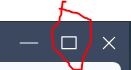
Just click it to change it.
Just changing that may be enough to let you see the edges and drag them to resize
However if you still can’t then get ‘hold’ of the window at the top (click and hold with the pointer near the top) and drag the whole window down a bit and to the left a bit, so that the bottom and left hand side are off the dispaly but you can see Desktop to the right and above it.

If you can do that then you should now be able to resize the top edge down and the right edge inwards, there is a minimum size that you can drag them to though. (890 x 673 pixels on my Toshiba).
Now drag the resized window back so that it’s fully onscreen.

Close CCleaner 7 and it should then reopen at the size you had reduced it to.