After I installed CCleaner for WIndows, I got a splash screen telling me how great CCleaner is, what is new, etc. and I cannot close that splash screen nor will it go away to let me run the program.
2 Likes
Try this..
Go into Windows Settings and set the display scale to 100%.
Run CCleaner 7 and get past the Welcome Screen.
Set your display scale back to what it was.
1 Like
I, like everyone else, was not pleased with being taken by surprise that v7 would replace my previous one and then NOT work like the previous version. It never cleans my system at 100%. Always stops around 91% (once at 96%). The screen typically says it cannot clean system files and such. Also, it shows it will clean “5 GB” of temp files… that has NEVER been the case with v6 and I run ccleaner every 2 to 3 days or so. Can we not just roll v7 back?
3 Likes
See here
1 Like
thanks for providing this, of course after I figured just about all of it out. Really frustrating experience. In the version 7 why did you remove the ability to manager one’s cookies? Why did you remove what seems like all the options of for personal settings? If u didn’t remove them, you hid them so freaking well, your paying users are frustrated with the program.
We moderators aren’t a “you”, we’re just users like you.
Cookie Manager is found in the following places
Custom Clean righthand pane > Settings
Health Check after a scan righthand pane> settings
Meant no disrespect. Moderators are appreciated. Wasn’t thinking that you would be someone not employed by the company. I am a frustrated end user/paying customer. Thanks for having a forum to get answers/help.
1 Like
Polite quick request for someone in CCleaner 7 support or dev.
Try installing and using it on a windows machine with the task bar across the top, instead of across the bottom, of the screen.
The top of the CCleaner 7 window is behind the task bar and many users may not know how to get the top of the CCleaner window out from behind the task bar. I am guessing nobody thought the task bar would ever be anywhere except the bottom of the screen.
Thanks for all your work
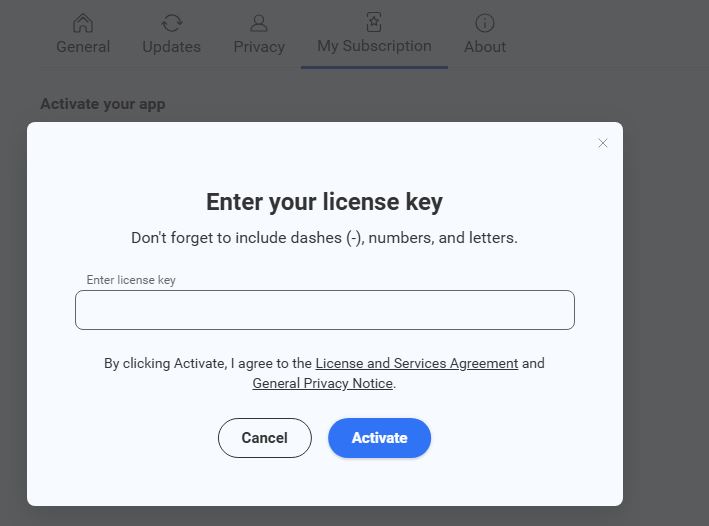
After installing the update which moved me to CCleaner 7 the system could
not read my my subscription or license key. There is not an area to re-enter the
license key for a the paid subscription. The CCleaner 7 program is just not
working. Please advise.
1 Like
Go to Settings > My Subscription: