Freeware Rebooted

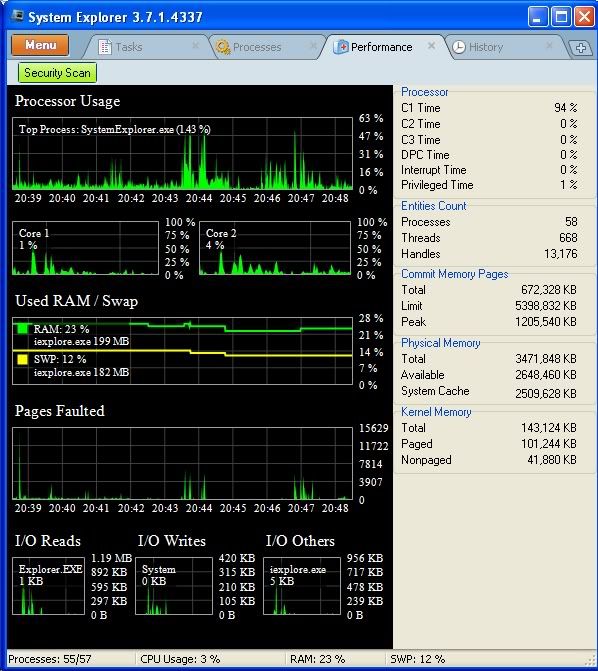
System Explorer

link: http://systemexplorer.net/

Its a system viewer and manager, and, err, explorer.

Has a portable version and an installer, and a version which is for W2K.

It phones home at install. :(

I tried the portable version, works OK. The little "+" sign (in the top right corner of the first picture) opens up lots of options.

They have a pretty good database of file explanations, and it will connect from the portable app to get information.

Looks cool. Big plus, that is. :)

Picture 1: th_SystemExplorer1.jpg Picture 2 (looks cool): th_SystemExplorer2.jpg

Paint.NET Effects

License: Freeware

Website: http://users.telenet...risvandermotten

Info:

Paint.NET Effects adds into Paint.NET many new useful effects.

Features:

* Drop Shadow.

* Duotones.

* Monochromes.

* Blurs.

* Color Accent.

* FadeEdge.

* Gradient.

* Gridlines.

* Object Align.

Warning:

The features it offers are nice but I've noticed every now and then that it can cause Paint.NET to crash.

Greenfish Icon Editor Pro

License: Freeware

Download: http://www.snapfiles...iconeditor.html

About:

Greenfish Icon Editor Pro (GFIE Pro) is a powerful icon, cursor, animation, icon library and image editor.

Features:

* Open and save in ICO, CUR, PNG, XPM, BMP and JPEG formats.

* Create icons up to 256x256 @ 32-bit.

* Create Vista compatible PNG compressed icons.

* Sophisticated selecting tools like marquee, lasso and magic wand, as in a professional photo editor.

* Create and test cursors.

* Extract icons and cursors from executable files.

* Dynamic color depth: you do not have to specify it explicitly, Greenfish Icon Editor will determine it for you.

* Drawing lots of kinds of gradients.

* Lots of filters including Hue shift, Remove matte and Drop shadow.

* Sample icons are included.

My Thoughts:

It's really a robust and good freeware icon editor, so much I'm dumping the old last freeware version of IcoFX in favour of Greenfish Icon Editor Pro.

HashTab

License: Freeware

Supported OSes: Microsoft Windows, and MAC

Website: http://www.implbits.com/

Mirrors:

http://www.snapfiles...et/hashtab.html

http://www.softpedia...t/HashTab.shtml

http://fileforum.bet...ws/1096345722/1

http://www.freewaref...gram_16737.html

About:

HashTab is a Windows shell extension that allows you to calculate file hashes directly from Windows Explorer. The program adds a new tab to the Properties dialog of each file, allowing you to quickly copy a hash value or compare it to verify file integrity.

HashTab supports a wide variety of hash algorithms, including; MD5, SHA1, SHA2, RipeMD, HAVAL and Whirlpool.

My Thoughts:

One of the best freeware file hashing/checksum tools I've ever used. HashTab will be replacing two other file hashing tools I have installed.

Looks interesting. I've always used WinMd5sum to check file hashes, always done the job for me.

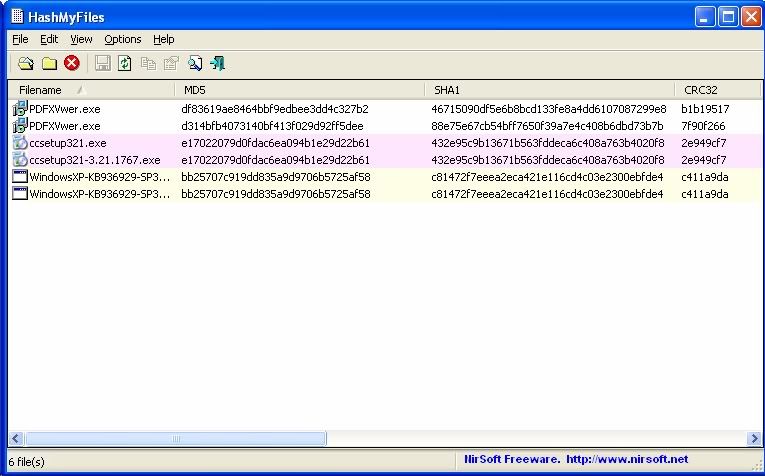
I like "HashMyFiles" from Nirsoft.

It is portable,

I can drag/drop multiple files into it and it shows simultaneously the MD5, SHA1, CRC32 checksums,

plus sundry details such as file name and path, size, timestamps etc.

Each file has a row, with details in columns allowing instant recognition of whether files have perfectly matching checksums.

Alan, can you explain to me more about the purpose of a hasher?

Correct me if I am wrong. It seems this must be used for every file you intend to use, then updated for the updates, which seems very time consuming to me to tediously hash, check hashes, etc. when you have multiple thousands of files to test?

I wonder what you use it for mostly? I may would, but I just can't see wasting that much time for what I do on here. I presume its a specialized thing for users planning to have around 50 or fewer files to hash?

Please enlighten me as I have heard many people speak of hashes & I wondered what their significance possibly could be unless they are applied to every file & every updated version of that file... Which would seem a waste of time to me.

But I may be wrong. I truly would love a more detailed explanation so I can make a more well informed choice.

Here's another one (HashCheck), somewhat similar in function to HashTab, but very light and very fast.

http://code.kliu.org/hashcheck/

Looks interesting. I've always used WinMd5sum to check file hashes, always done the job for me.

MD5 is now considered in-secure. Yet I still mostly see it listed on websites.

Here's another one (HashCheck)

That looks more inticing than the one I just started using, the small size and ability to use checksum files all from one program will be nice.

Alan, can you explain to me more about the purpose of a hasher? ...

Don't want to steal Alan's thunder here, just want to add a vote for Nirsoft's HashMyFiles. Its fast.

It is a standalone exe, just store it somewhere and click it when you want to use it. It opens a window.

You can drag into it's window a single file, a folder, a zip file, or an ISO file, I've done all those.

It puts the results for each file on its own line in its window.

If the hashes of two files match, the lines for them will be the same color.

That makes it fast ... if one out of 20 lines in the (Hasher) window is NOT colored, that file alone does not have a match.

That looks more inticing than the one I just started using, the small size and ability to use checksum files all from one program will be nice.

One small additional feature is that you can highlight multiple files simultaneously, right-click for Properites, then the checksums for all of those files are displayed in the Checksum tab.

Okay after looking around I have ditched WinMd5sum (although it's always been a good'un for me) and gone with Nirsoft's HashMyFiles.

Alan, can you explain to me more about the purpose of a hasher?

My primary purpose was to validate a download of any "important" file.

It is rare, but I have experienced a successful download which failed hash checksum validation,

even though the download passed the Internet Protocol tests that determined whether a packet needed to be re-tried.

The hash checksum is as provided by the developers - if they are bothered or pressured by users.

From the trusted supplier site the checksum can be copy/pasted into notepad and the download can be obtained.

Sometimes the checksum Hexadecimal values are stated in Upper case, sometimes in Lower case.

HashMyFiles can compute the hash checksums and can select whether to display the Hexadecimal values in Upper case or lower case,

and the relevant MD5 or SHA1 value can then be pasted into Notepad on the next line for immediate comparison.

If Piriform published hash checksums for their products,

it would be possible for Download.com to also publish a checksum for their spyware variant,

and to justify that action on the basis that it was needed to validate the accuracy of the Internet transfer.

I actually doubt the NEED for using hash checksum validation on CCleaner BECAUSE

Its properties includes Digital Signatures and by selecting the name of the signer (Piriform) and clicking "Details" button,

it will think for a very much longer than HashMyFiles would but eveyually it tells me

"This Digital Signature is OK."

By clicking on "Advanced" I see

"Digest Algorithm sha1"

I need HashMyFiles for speed even when there are Digital Signatures,

and often software does not have Digital signatures built in.

For anyone who wants to see the MD5 checksum for ccleaner it is shown under the technical tab of the filehippo download

http://www.filehippo..._ccleaner/tech/

The MD5 checksum info is also given under the technical tab when you download Defraggler, Speccy and Recuva.

@ Super,

I use HashMyFiles to compare files. It ignores file names.

For example, ccsetup321-1767.exe is a renamed copy of ccsetup321.exe ... same hashes.

The "PDFXVwer.exe" files are different versions w/ same name ... different hashes.

The WindowsXP-KB936929 ... exes are the same file from 2 different folders, different download times ... same hashes

Guess I could delete one of those. :P

Valuable app for an incorrigible downloadaholic with a poor memory.

th_NirsoftHasher1.jpg

I also have used Nirsoft's HashMyFiles in the past, it's how I was able to get rid of hundreds of duplicate files. However nowadays I need the ability to create checksum files which I can store on a data DVD to scan the whole disc for matching hashes to know if there's any disc errors years into the future.

One small additional feature is that you can highlight multiple files simultaneously, right-click for Properites, then the checksums for all of those files are displayed in the Checksum tab.

I tried it out and liked it initially however I don't know if I found a bug in HashCheck, or a Windows issue/limitation using it.

When making a checksum file for a whole folder structure with sub-folders and saving the checksum file directly into that folder it will display a "mismatch" error for the .SFV, .MD5, .SHA1 checksum file itself which should not have a computed hash on it to begin with. It's definately not what I expected as it should be able to ignore such checksum files it's in the process of creating like some other recursive hash tools do.

Video To Video

URL: http://www.videotovideo.org/

License: Freeware

Type: Video Conversion

Available as a portable version or install version.

Key Features:

· Free software.

· Supports over 200+ of input formats.

· Supports over 700+ of output presets.

· Supports a large number of output video formats: AVI, DivX, Xvid, MPEG-4, AVC/H264, MPEG, MPEG2, MOV, WMV, 3GP, 3GP2, MKV, WEBM, SWF, FLV, RM, ASG, GIF, DV, etc.

· Supports many output audio formats: MP2, MP3, AAC, AC3, WAV, M4A, Vorbis, 3GPP, FLAC, MMF, IFF, AU, etc.

· You can convert almost all existing video and audio formats.

· Easy to use.

· Has a built-in high quality DVD Ripper that supports foreign languages subtitles.

· Video Joiner with which you can combine multiple movies in one video.

· Has a built-in Video Splitter with which you can cut out parts of the video that you find interesting, so you don’t convert the entire video.

· Converting video is reliable and fast.

· You can also convert to DVD video (supported DVD Authoring).

· Embedded tools for burning video DVDs.

· Support for subtitles (internal and Vobsub Filter).

· Video presets.

· Basic video filters.

· Watermark.

· Shapshots.

· Live preview.

· Main languages are supported.

What I like about it:

Very low system resource usage, even on old XP systems with limited RAM. It's really easy to use and has a bunch of profiles to support many devices and hardware. Also unlike many other video conversion tools when you tell it to output a video to DVD Video it does just that by creating a burnable DVD Video folder instead of some bog standard .MPG file.

All these are freeware and still in active development. I leave it to you to discover what these do. I'm too lazy to type a description. But rest assured, this is all quality stuff that's been around for years and years. And there's no spam or toolbars or any annoyances with these. Nor are the web pages gonna do a driveby on ya' either..

Orbiter SpaceFlight Simulator

http://orbit.medphys.ucl.ac.uk/

http://www.alteaaerospace.com/

http://www.orbithangar.com/

http://www.orbiter-forum.com/

XnView

http://www.xnview.com/

Irfanview

http://www.irfanview.com/

Stellarium

http://www.stellarium.org/

Stella Atari VCS Emulator

http://stella.sourceforge.net/

http://www.atariage.com

AppleWin

http://applewin.berlios.de/

http://developer.ber...jects/applewin/

http://adtpro.sourceforge.net

ftp://ftp.apple.asimov.net/

M.A.M.E.

http://mamedev.org/

FileZilla

http://filezilla-project.org/index.php

WinDirStat

http://windirstat.info

Sysinternals

http://technet.micro...US/sysinternals

http://technet.micro...ernals/bb842062

http://technet.micro...ernals/bb545027

Clickey

http://www.grc.com/f...are/clickey.htm

Hiren's Boot CD

http://www.hiren.info/pages/bootcd

Format Factory

http://www.pcfreetime.com/

So I assume that's safe to use again? I don't remember the exact details but they were caught stealing or not giving license details and credits or whatever it was the open-source backend programs they used.

Probably, I'd need to research further. There always seems to be some sort of licensing agreement dispute when it comes to codecs and media. It's like the same thing with PhotoRecovery software. Utilities could be made better if they could get around (or pay) the licensing fees for permission to write certain headers. Ugh..